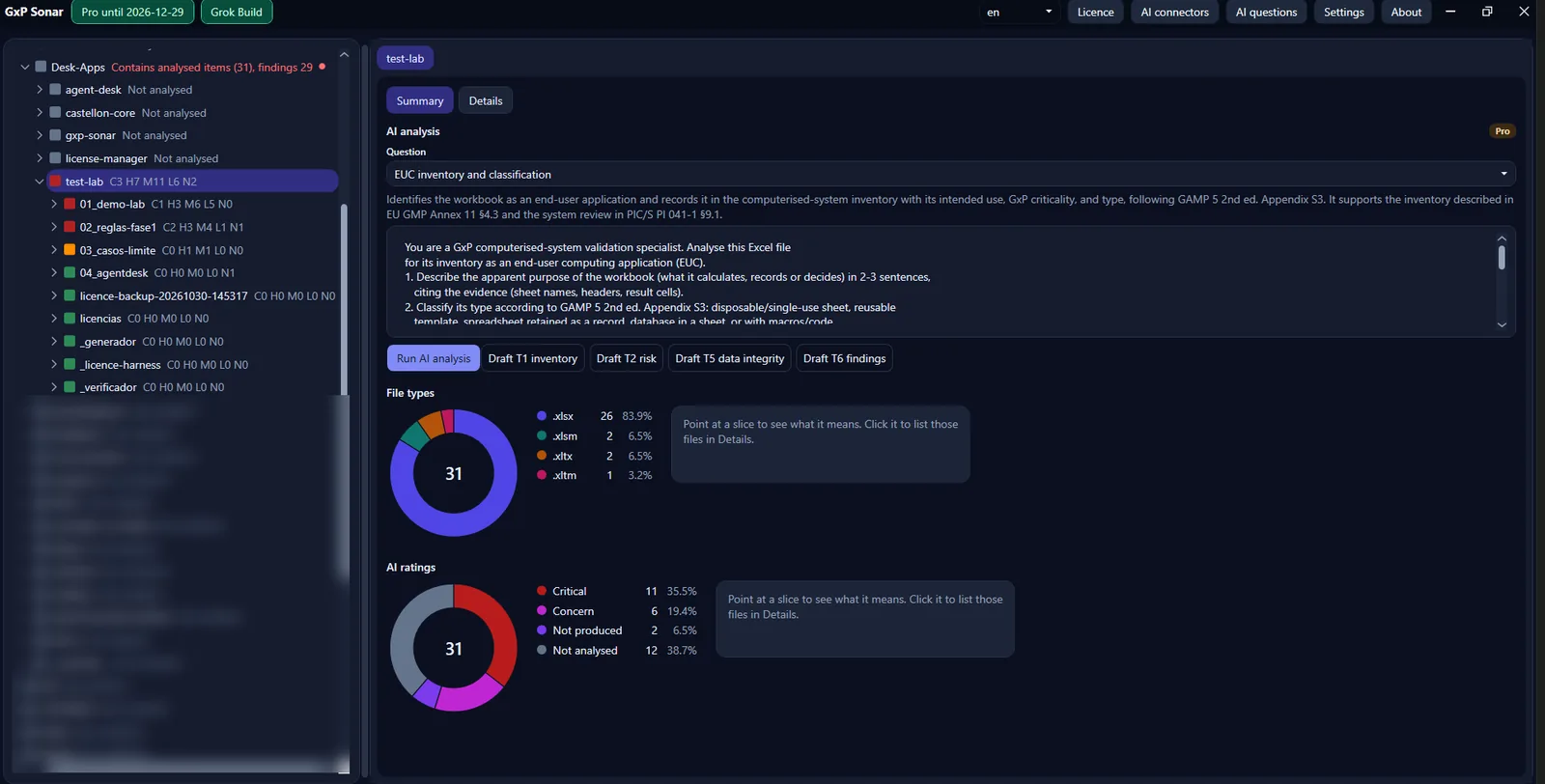
GxP Sonar on Windows (test data; folder names partly blurred).
GXP SONAR
GxP Sonar is a portable Windows app that reviews folders of Excel workbooks and flags GxP data-integrity risks: formulas, VBA macros, protection, external links and hand-typed values where a formula should be. No admin rights, no installation: it runs with the employee's own permissions.
Read-only by default: GxP Sonar does not modify, save or run your files. Writing in the analysed folders is a separate, optional add-on.
GxP Sonar on Windows (test data; folder names partly blurred).
Labs and quality teams rely on hundreds of Excel sheets full of calculations, macros and links. Reviewing them by hand for an audit or a validation takes days, and errors in a single cell or macro go unnoticed.
When to use it: before an audit, a validation or a migration.
A single .exe, no installation or services; uses the employee's permissions.
Does not save your files, run macros or refresh links. Writing is a separate, optional add-on: it lets Codex, Claude, Copilot and Grok write in the analysed folders and must be requested and included in the licence.
Every finding with its risk, sheet and cell, or VBA module and line.
Grok Build, Codex, Claude, Gemini, Copilot Studio or an OpenAI-compatible service, on your own account.
Structure only, masked data or full data (the last one only with your consent).
A draft to review, in the language the analysis is run in: each file with its SHA-256 hash, app version and build date.
New in 0.2.4: GxpSonar.exe is now code-signed (signer “Antonio Castellon Campos”).
In 0.2.3: the linked engine name appears in the header when it is linked and when a licence is imported, without restarting; the separate, optional write add-on lets Codex, Claude, Copilot and Grok write in the analysed folders, including existing files (PDF and Word reports stay in the reports folder; the add-on must be requested and included in the licence); each file’s history lists only its distinct contents since analysis.
Earlier, in 0.2.2: automatic updates: the app now checks for new versions and installs updates itself. In 0.2.1: AI analysis of Word and PDF documents with its own GxP document-review prompt (Pro); each prompt shows which file types it applies to; automatic language detection for custom prompts; files can be queued while an analysis is running; Grok shown under its own name; fix for settings mixing between parallel processes.
Open GxPSonar.exe and pick the folder. Only what you can already open is analysed.
Reviews each workbook on your PC and records every finding with its risk and exact location: sheet and cell, or VBA module and line. Nothing leaves the machine.
With your own AI engine, it explains the findings and compares the files with each other, in plain language with precise GxP terms.
| Structure only | Masked | Full data | |
|---|---|---|---|
| What the AI receives | Layout and formulas; no value analysis | Values replaced by placeholders | The real content |
| Consent | No | No | Yes, explicit |
| Best for | Reviewing formulas and structure | Linking files without seeing the data | Finding errors in the values |
The AI runs on the customer's own account; GxP Sonar adds no AI licences. Without AI, the analysis stays on your PC.
Please note: Any local CLI engine acts with its own permissions and can modify files (e.g. after a malicious prompt); its security depends on that provider and its configuration.
Seven built-in prompts for the AI analysis. Each one cites the clause it refers to, for guidance. They produce draft evidence for a person to review; they do not decide whether a sheet is fit for use.
| Prompt | What it checks | References (for guidance) |
|---|---|---|
| EUC inventory and classification | Apparent purpose, type, GxP use, proposed criticality and structure facts of the workbook, with questions for the key user | EU GMP Annex 11 §4.3; GAMP 5 2nd ed. App. S3, M4; PIC/S PI 041-1 §9.1.2 |
| GxP risk assessment of the sheet | Risk per sheet and critical function, by impact, probability and detectability | EU GMP Annex 11 §1; GAMP 5 2nd ed. Ch. 5, App. M3; PIC/S PI 041-1 §9.1.5–9.1.6 |
| Map of critical calculations | The calculation chain from inputs to the reported result, formula by formula with cell references | EU GMP Annex 11 §5, §4.7; 21 CFR 211.68(b); GAMP 5 App. S3 |
| Technical integrity of formulas | Errors, incomplete ranges, broken references, fixed values typed over formulas, circular references | EU GMP Annex 11 §5; PIC/S PI 041-1 §9; GAMP 5 App. S3 |
| Protection and access control | Locked cells, workbook and sheet protection, read-only settings | EU GMP Annex 11 §12; 21 CFR Part 11 §11.10(c), (d), (g); GAMP 5 App. O11 |
| ALCOA+ checklist for the file | The file against ALCOA+ (attributable, legible, contemporaneous, original, accurate, complete, consistent, enduring, available) | PIC/S PI 041-1; MHRA GXP Data Integrity Guidance (2018) |
| Findings summary and CAPA proposal | Findings ranked by risk, with proposed corrective and preventive actions (owner and date left to you) | GAMP 5 2nd ed. App. O5, M3; EU GMP Annex 11 §1, §11 |
GxP Sonar helps the owner of the files get ready before any audit. The AI can be wrong, so the review and the decision always stay with a person. It does not replace validation or the judgement of the responsible person.
Free Lite (trial: 3 Pro AI analyses; up to 20 files a month). Basic CHF 390 and Pro (AI) CHF 890 per PC per year, excl. VAT. Write-to-folder add-on CHF 190; PDF reports do not need it. Details. Demo on request.
Any local CLI engine acts with its own permissions and can modify files (e.g. after a malicious prompt); its security depends on that provider and its configuration.
| GxP Sonar | |
|---|---|
| Status | Available (v0.2.6) · demo on request |
| Download | Download for Windows (zip, about 65 MB) · SHA-256 Free Lite; Basic CHF 390, Pro CHF 890 per PC/year (sonar.castellon.ch). |
| Platform | Windows, portable .exe, no admin, no installation |
| Flyer | Download flyer (PDF, EN) · ES |
| Suite | Castellon.CH Suite flyer (PDF, EN) · ES |
| How to get it | Download (Free Lite) · Request a Basic or Pro licence · Request a demo · Support: [email protected] |
Write to us to request a demo of GxP Sonar for your lab or quality team in Switzerland or the EU.
GxP Sonar helps review spreadsheets; it does not replace validation or the judgement of the responsible person, and does not by itself guarantee regulatory compliance. The AI can be wrong. Grok, Codex, Claude, Gemini, Copilot Studio, OpenAI and Excel are trademarks of their respective owners.
© Antonio Castellon · [email protected] · [email protected]